JK STUDY BUDDY CLASS 2 WEEKLY QUIZ SUBJECT ENGLISH
J&K Weekly Practice
Week 62 · Class 2 · English · 01/08/2026
Before you begin
12 questions · pick one answer for each
JK Study Buddy Chatbot on SwiftChat: Registration, Practice Tests & Benefits
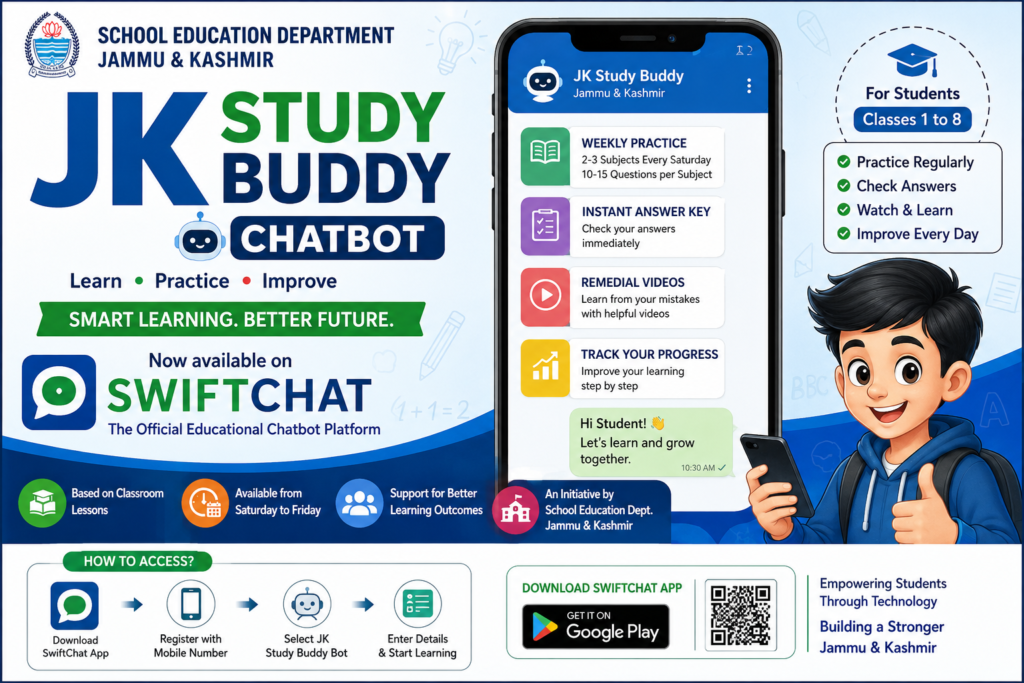
JK Study Buddy Chatbot is a digital learning initiative being implemented in Jammu and Kashmir through the education department’s Vidya Samiksha Kendra (VSK) ecosystem. The chatbot is available through the SwiftChat app and is designed to help students practise lessons, assess their understanding and improve learning through regular practice and remedial content.
The initiative has become an important part of technology-enabled education in J&K, particularly for students in Classes 1 to 8. In September 2025, an orientation session in Srinagar highlighted weekly practice tests through the JK Study Buddy Chatbot and the use of student scores to monitor learning progress.
What is JK Study Buddy Chatbot?
JK Study Buddy is a digital practice and learning chatbot designed for school students in Jammu and Kashmir. Students can use the chatbot to attempt questions related to topics that have already been taught in their classrooms.
According to the available JK Study Buddy user manual, students receive 2–3 subjects every Saturday, with around 10–15 questions per subject. These questions remain available during the practice period until the following Friday.
The system provides students with immediate feedback after completing their practice. Students can view the answer key and, where available, access remedial videos for questions they answered incorrectly.
This makes JK Study Buddy useful not only for testing knowledge but also for identifying learning gaps.
JK Study Buddy and Vidya Samiksha Kendra
JK Study Buddy is part of the wider digital education initiatives associated with Vidya Samiksha Kendra (VSK) in Jammu and Kashmir.
VSK is intended to support data-driven educational monitoring and decision-making. During an orientation programme in Srinagar, education officials highlighted the use of student registration data, practice-test participation and average scores from JK Study Buddy to monitor educational progress.
The School Education Department has also been reviewing the progress of JK Study Buddy as part of its digital initiatives. In a November 2025 review meeting in Jammu, the Director School Education Jammu reviewed the progress of the chatbot and directed officials to ensure timely completion of digital processes.
Who Can Use JK Study Buddy?
JK Study Buddy is primarily intended for school students, with the available programme information specifically referring to students from Classes 1 to 8.
The chatbot can be useful for:
- Government school students
- Students studying in Classes 1 to 8
- Students who want additional practice
- Parents who want to encourage regular revision
- Teachers monitoring students’ learning progress
- Schools participating in VSK digital initiatives
Main Features of JK Study Buddy
1. Weekly Practice Questions
Students can receive practice questions on selected subjects every week. The questions are intended to relate to topics already covered in classroom teaching.
2. Multiple Subjects
The user manual indicates that students receive approximately 2–3 subjects every Saturday, with around 10–15 questions per subject.
3. Instant Answer Key
After completing the practice, students can access the answer key. This helps them identify which questions they answered correctly and where they need improvement.
4. Remedial Learning Videos
One of the most useful features is the availability of remedial videos following practice. These resources are intended to help students understand concepts related to questions they answered incorrectly.
5. Learning Through Practice
The chatbot encourages students to follow a simple cycle:
Learn → Practise → Check Answers → Identify Mistakes → Watch Remedial Content → Improve
This can help make revision a regular part of students’ learning routine.
How to Register for JK Study Buddy on SwiftChat
Students can access JK Study Buddy through the SwiftChat app. SwiftChat is an educational chatbot platform developed by ConveGenius and is available through major mobile app platforms. The current Google Play listing describes SwiftChat as a platform containing educational bots, practice activities, videos and other learning resources.
Step 1: Install SwiftChat
Download and install the SwiftChat app on your smartphone.
Download SwiftChat from Google Play
Step 2: Register Your Mobile Number
Open SwiftChat and enter your mobile number. Complete the verification process using the OTP received on your phone.
Step 3: Explore Educational Bots
After verification, open the bot section and look for the Jammu & Kashmir Study Buddy Bot.
Step 4: Select Language
Choose the appropriate language or medium available to you.
Step 5: Enter School UDISE Code
The registration process requires the student’s School UDISE Code.
Make sure the correct school UDISE code is entered.
Step 6: Enter Student Details
Students may be required to select or enter details such as:
- Class
- Gender
- Full name
After completing the registration process, the student can access the JK Study Buddy home menu.
How to Attempt JK Study Buddy Practice Tests
After registration, students can follow the chatbot instructions to start practising.
- Open JK Study Buddy.
- Select the registered student’s name.
- Verify the displayed details.
- Select Start Practicing.
- Choose the subject.
- Select the option to begin the practice.
- Answer the questions carefully.
- Complete the practice test.
- Check the answer key.
- Watch remedial videos where provided.
The user manual indicates that students can also manage student profiles and change the medium of instruction through the chatbot interface.
Why Should Students Use JK Study Buddy?
Regular use of JK Study Buddy can help students develop a habit of revision and self-assessment.
For Students
It provides an opportunity to practise questions regularly and identify areas where additional study may be required.
For Teachers
Student participation and performance data can help teachers understand learning gaps and plan appropriate classroom interventions.
For Parents
Parents can encourage children to complete their weekly practice activities and use remedial content when required.
For Schools
School-level participation and performance information can contribute to monitoring learning outcomes and improving academic support.
JK Study Buddy vs Traditional Revision
Traditional revision often depends on notebooks, worksheets and classroom tests. JK Study Buddy adds a digital component to this process.
| Traditional Revision | JK Study Buddy |
|---|---|
| Usually classroom-based | Digital and mobile-based |
| Teacher checks answers | Instant answer key available |
| Remedial support may take time | Supporting videos can be provided |
| Periodic tests | Regular practice |
| Manual monitoring | Digital participation and performance data |
The chatbot should not be viewed as a replacement for teachers or classroom learning. Instead, it can serve as an additional practice and revision tool.
JK Study Buddy for Classes 1 to 8
The programme has specifically been associated with weekly practice for students from Classes 1 to 8. Education officials in Srinagar have directed schools to ensure participation in weekly practice tests and have emphasized analysing average scores to understand student progress.
For younger learners especially, regular short practice sessions can be useful for strengthening foundational concepts.
What Should Students Do After Getting an Answer Wrong?
Getting an answer wrong should not be treated simply as a low score.
Students should:
1. Check the answer key
Find out which answer was correct.
2. Identify the concept
Try to understand why the selected answer was incorrect.
3. Watch the remedial video
Where a supporting video is available, use it to revise the relevant concept.
4. Revisit the textbook
Read the corresponding chapter or topic again.
5. Ask the teacher
If the concept remains unclear, ask the subject teacher for further explanation.
This approach turns an incorrect answer into an opportunity for learning.
Tips for Students Using JK Study Buddy
Students can get better results by following a few simple habits:
- Complete the weekly practice on time.
- Read every question carefully.
- Do not guess answers unnecessarily.
- Check the answer key after completing the test.
- Note down difficult questions.
- Watch remedial videos where available.
- Revise the relevant textbook chapter.
- Ask your teacher about concepts you still find difficult.
- Encourage regular participation rather than focusing only on marks.
Frequently Asked Questions (FAQs)
What is JK Study Buddy?
JK Study Buddy is a digital learning and practice chatbot associated with the School Education Department’s digital education initiatives in Jammu and Kashmir. It is available through the SwiftChat platform.
What is JK Study Buddy used for?
It is used to provide students with regular practice questions, answer keys and remedial learning resources to support revision and improve understanding.
Which classes are covered under JK Study Buddy?
Available programme information specifically refers to students from Classes 1 to 8.
Is JK Study Buddy available on SwiftChat?
Yes. The JK Study Buddy Bot is accessed through the SwiftChat application.
How many questions are provided in JK Study Buddy?
The available user manual states that students receive approximately 10–15 questions per subject, with around 2–3 subjects provided weekly.
When are the weekly questions available?
According to the user manual, the weekly practice is made available from Saturday through Friday.
Does JK Study Buddy provide answer keys?
Yes. Students can access an answer key after completing their practice.
Does JK Study Buddy provide remedial videos?
Yes. The user manual describes remedial videos designed to help students understand concepts associated with incorrectly answered questions.
What information is required for student registration?
The registration process described in the user manual includes the student’s school UDISE Code, class, gender and full name, along with mobile-number verification.
Is JK Study Buddy a replacement for classroom teaching?
No. It should be considered a supplementary digital practice and learning resource. Classroom teaching, textbooks and teacher guidance remain important components of education.
Final Words
The JK Study Buddy Chatbot on SwiftChat is an important digital learning initiative supporting students in Jammu and Kashmir. By providing regular practice questions, instant answer keys and remedial learning videos, it can help students revise classroom topics and identify areas requiring additional attention.
The initiative also supports the broader objectives of Vidya Samiksha Kendra, where digital data and educational technology are being used to monitor participation and learning progress.
Students and parents should therefore make regular use of the available learning resources and treat JK Study Buddy as a supplement to classroom teaching and textbook-based study.
For more Jammu & Kashmir education updates, JKBOSE information, teacher notifications, study material and student resources, keep visiting JammuKashmirInfo.com.
Author Profile

- The Bijli Engineer is an education and career content writer contributing to JammuKashmirInfo.com, with a focus on Jammu & Kashmir education, government jobs, competitive examinations, and student guidance.
Latest entries
 BlogSeptember 1, 2026JKSSB Class IV Recruitment 2026 Notification Out, Apply Online For 2863 Vacancies
- BlogAugust 21, 2026lesson
 BlogAugust 17, 2026JK STUDY BUDDY CLASS 7 WEEKLY QUIZ SUBJECT SST
- BlogAugust 17, 2026JK STUDY BUDDY CLASS 7 WEEKLY QUIZ SUBJECT MATH